---
title: How to Resend a Failed Fax or Email Notification
description: A failed fax or email occurs when the One Time Use Code notification that is sent to the Health Care Provider by fax or email is not successfully delivered.
---
[Skip to content](https://help.auxita.com/how-to-resend-a-failed-fax-or-email-notification#main-content)
- [English - Canada](https://help.auxita.com/how-to-resend-a-failed-fax-or-email-notification)
- [Français - Canada](https://help.auxita.com/fr-ca/how-to-resend-a-failed-fax-or-email-notification)
English - Canada
Show submenu for translations
[Contact Support](https://help.auxita.com/kb-tickets/new?hsLang=en-ca)
[](https://help.auxita.com/?hsLang=en-ca)
- [🖥️ Log into Auxita](https://my.auxita.com/)
- [▶️ Watch video tutorials](https://help.auxita.com/onboarding-videos)
- [🌐 About Auxita](https://auxita.com/)
Open main navigation
Close main navigation
- [🖥️ Log into Auxita](https://my.auxita.com/)
- [▶️ Watch video tutorials](https://help.auxita.com/onboarding-videos)
- [🌐 About Auxita](https://auxita.com/)
- - [English - Canada](https://help.auxita.com/how-to-resend-a-failed-fax-or-email-notification)
- [Français - Canada](https://help.auxita.com/fr-ca/how-to-resend-a-failed-fax-or-email-notification)
English - Canada
Show submenu for translations
- [Contact Support](https://help.auxita.com/kb-tickets/new)
- [What's new?](https://release.auxita.com/)
[What's new?](https://release.auxita.com/?hsLang=en-ca)
We're here to help you
- There are no suggestions because the search field is empty.
1. [Auxita Help](https://help.auxita.com/?hsLang=en-ca)
2. [Healthcare Providers & Prescribers](https://help.auxita.com/healthcare-providers-prescribers?hsLang=en-ca)
August 28, 2026
# How to Resend a Failed Fax or Email Notification
## A fax or email notification may fail if the recipient's contact information is incorrect, the email is undeliverable, or the fax line is unavailable. When this occurs, the One-Time Use (OTU) Code is not delivered to the Health Care Provider.
For more information on how to send a One-Time Use (OTU) Code, please review the following article: [How to Send a One-Time Use Code](https://help.auxita.com/how-to-send-a-one-time-use-code?hs_preview=SJXIAejt-185337014864&hsLang=en-ca)
**NOTE** If a fax or email notification fails for an **Additional Form** or **Prior Authorization**, the form status will update and a red **X** will appear on the **Physician Signature** stage in the patient's profile.
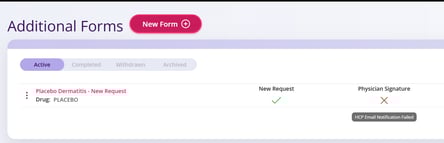
** NOTE** If the email sent to the Health Care Provider fails, you’ll see a banner indicating that the notification was not delivered.

#### **How to Handle Failed Faxes or Bounced Emails**
A fax or email notification is considered failed when the One-Time Use (OTU) Code cannot be delivered to the Health Care Provider.
#### **Steps to resend the failed fax or email **
You can resolve the failure by resending the notification.
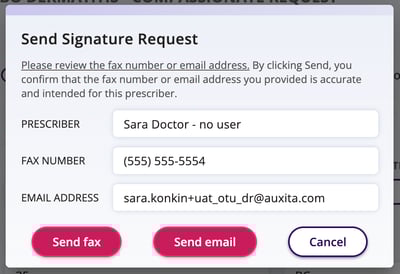
1. Locate the patient's form that requires a physician signature.
2. Click **Resend for Physician Signature**.

3. Enter the correct email address or fax number.
4. Click **Send**.
- [Getting Started](https://help.auxita.com/getting-started?hsLang=en-ca)
- [Healthcare Providers & Prescribers](https://help.auxita.com/healthcare-providers-prescribers?hsLang=en-ca#main-content)
- [General](https://help.auxita.com/healthcare-providers-prescribers?hsLang=en-ca#general)
- [Enrolment](https://help.auxita.com/healthcare-providers-prescribers?hsLang=en-ca#enrolment)
- [Documents](https://help.auxita.com/healthcare-providers-prescribers?hsLang=en-ca#documents)
- [Referral Enrolments](https://help.auxita.com/healthcare-providers-prescribers?hsLang=en-ca#referral-enrolments)
- [Patient Management](https://help.auxita.com/healthcare-providers-prescribers?hsLang=en-ca#patient-management)
- [Messaging](https://help.auxita.com/healthcare-providers-prescribers?hsLang=en-ca#messaging)
- [Premium Features](https://help.auxita.com/healthcare-providers-prescribers?hsLang=en-ca#premium-features)
- [Patient Support Programs](https://help.auxita.com/patient-support-programs?hsLang=en-ca#main-content)
- [General](https://help.auxita.com/patient-support-programs?hsLang=en-ca#general)
- [Prior Authorizations](https://help.auxita.com/patient-support-programs?hsLang=en-ca#prior-authorizations)
- [Pharmacy](https://help.auxita.com/pharmacy?hsLang=en-ca#main-content)
- [Appointments/Scheduling](https://help.auxita.com/pharmacy?hsLang=en-ca#appointments-scheduling)
- [Patients](https://help.auxita.com/patients?hsLang=en-ca)
- [Account & Settings](https://help.auxita.com/account-settings?hsLang=en-ca#main-content)
- [Integrations](https://help.auxita.com/account-settings?hsLang=en-ca#integrations)
- [Additional Forms](https://help.auxita.com/additional-forms?hsLang=en-ca)
[](https://auxita.com)
##### **Taking care of healthcare. **
Auxita’s digital platform seamlessly and securely connects physicians, patients, insurance providers, and patient support programs together –
reducing administrative burdens and empowering medical practices to deliver care faster and more efficiently to patients.