
 NOTE Before creating a Program Patient, ensure you have selected the correct Facility.
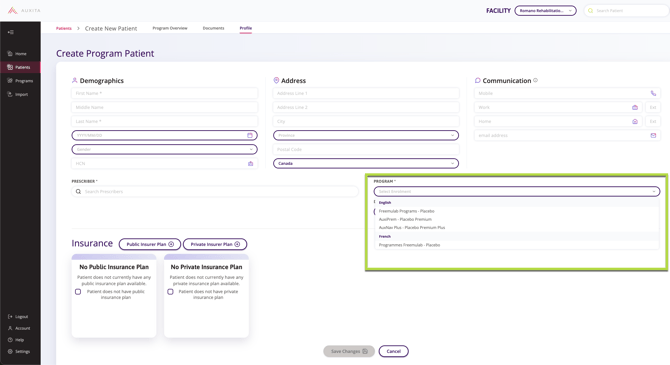
Who Can Create a Program Patient
Important: Not all users with Create Program Patient permissions experience the same workflow. Behaviour may vary depending on role configuration.
The ability to create a Program Patient is available to the following roles:
Field Case Managers (FCMs)
Field Case Managers with appropriate permissions can create a Program Patient to initiate a digital Prior Authorization or Compassionate Request through Auxita for a patient who was enrolled outside of Auxita.
When an FCM clicks Create Patient, they are prompted to confirm whether the patient is already enrolled in a Patient Support Program.
Patient Support Program (PSP) Staff
Patient Support Program staff with appropriate permissions can also create Program Patients.
However, PSP staff may not see the same enrolment prompt or branching options as FCMs.
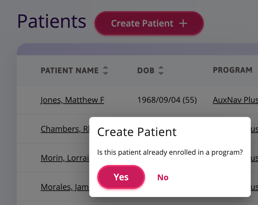
If the patient is already enrolled in a PSP and you wish to create a Program Patient in Auxita, choose Yes to go to the Create Program Patient screen.
If the patient is not yet enrolled in a PSP, select No to continue to create a patient like normal and initiate a new Enrolment through Auxita.
Creating Program Patients
After entering the patient’s demographic information, complete the following steps on the Create Program Patient screen:
-
Search for the Prescriber who enrolled the patient into the Program.
-
Select the Program the patient is already enrolled in from the dropdown.
-
Adjust the Date of Enrolment if it differs from the current date.
-
Enter the Patient’s Program ID, if available.

NOTE If you select a Prescriber who is not part of the selected Facility, you will see this warning:
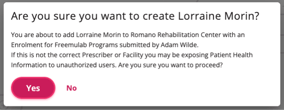
Select Yes only if you are certain you want to proceed. If you need help editing a patient’s profile or adding a Program ID after creation, refer to: How to Add a Patient’s Program ID
Viewing a Program Patient
After a Program Patient is added:
-
An Enrolment tile appears in the patient’s Program Overview
-
Opening the enrolment displays a message indicating the patient was enrolled outside of Auxita
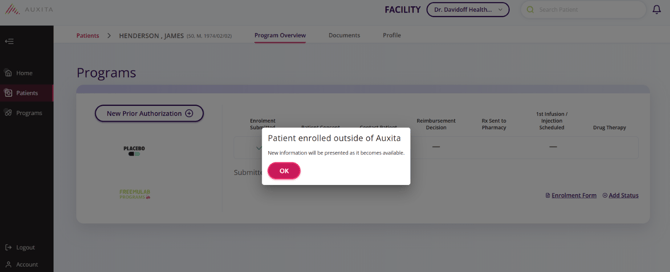
Once added, you will have access to functionality associated with submitted enrolments, including (when permitted by the Program):
-
Document Uploads
-
Financial Assistance Cards
-
Additional Forms
-
Digital Prior Authorization Forms
For information on creating patients that are not already enrolled in a Patient Support Program, check out the following article: How to Create a Patient Profile