NOTE Only users with the appropriate permissions can complete and submit enrolment forms without a prescriber’s signature. If you do not have this permission, the option to submit without a signature will not be available.
For more information on how to begin an enrolment, please review the following article:
How to Enrol a Patient in a Patient Support Program
Steps on how to submit the form
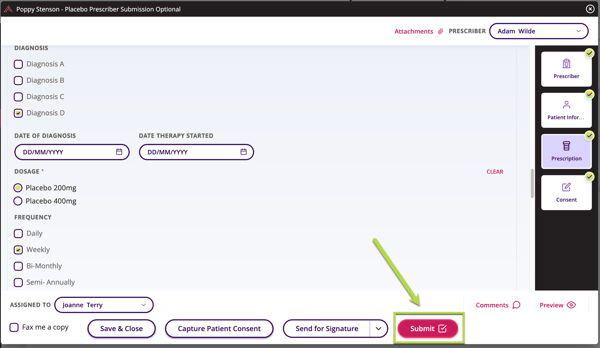
- Initiate the form from the search bar in the program section or patient's profile and begin filling it in.
- Once the form is filled in and ready for the next step, click Submit to continue without a signature.
- A warning message appears if the Physician Signature is missing. Read and acknowledge the message before proceeding.
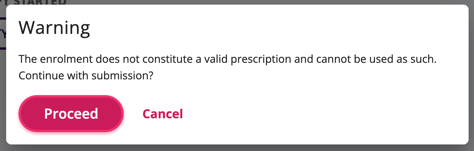
- A warning message appears if the Physician Signature is missing. Read and acknowledge the message before proceeding.
- After confirming, the form is automatically sent to the program.
 TIP Use Send for Signature if unsure whether the prescriber should sign before submission.
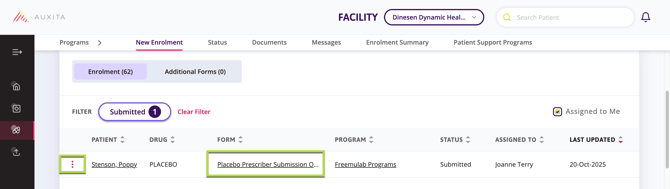
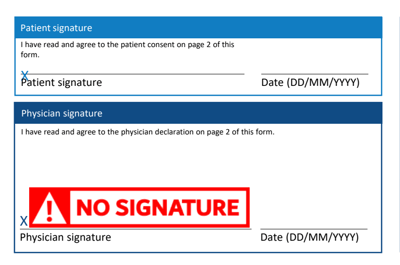
 NOTE Once the form has been submitted, either click the three elipses or the underlined form to open the PDF version from the status table. The downloaded PDF document displays a NO SIGNATURE watermark in the signature field if the physician has not signed.