
If a Prior Authorization has not yet been submitted to the payer, it can be cancelled through Auxita.
- Go to the Programs section and filter the Status Table to view all Reimbursements (Prior Authorizations).
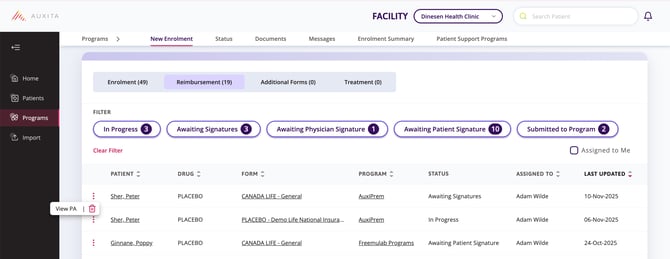
- You can further filter the list by specific statuses, Assigned to Me, or click a column header to sort alphabetically or chronologically.
- Once you’ve found the Prior Authorization you’d like to cancel, click the ellipses to the left of the patient’s name.
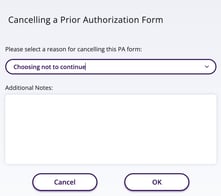
- Click the trash can and select the reason for cancelling the Prior Authorization from the dropdown. There is a space for Additional Notes.
- Press OK to complete the cancellation.
 NOTE After a Prior Authorization is cancelled, it remains visible on the patient's profile. Any cancellation notes entered at the time of cancellation are available in an info-bubble tooltip, and the cancellation is also recorded in the patient's Activity table.