
Prior Authorization involves collecting information from the physician and patient and completing a form for submission to the insurance provider to determine whether the medication is eligible for coverage.
Auxita supports both private and public Prior Authorization forms.
 NOTE Each form’s workflow depends on the program’s configuration, which is reflected in the Reimbursement Status tile.
From the Program’s Section
- Open the Programs Section.
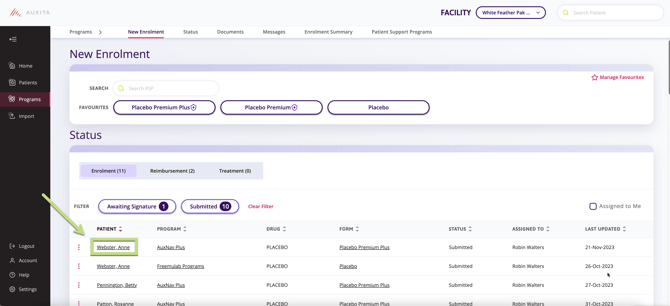
- On the top of the Programs overview, select Status, and then select Enrolment to filter the table.
-
Find the Patient with a submitted enrolment that now requires Reimbursement and click on their name to select the patient.
-
Click the New Prior Authorization button.

-
Select the Prior Authorization Form from the list of available forms.
-
The Prior Authorization Form will open automatically.
-
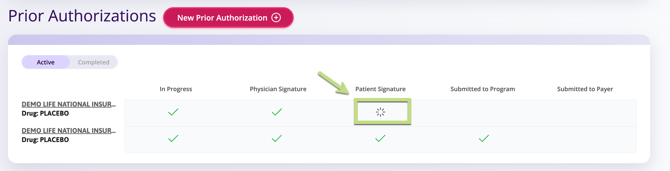
Fill in all details on the form and click Send for Patient Signature when complete. The reimbursement form status changes to In Progress.
-
The patient will receive an email or SMS notification from Auxita to sign their consent.
-
Once signed, the Reimbursement Status on the enrolment card shows a green check mark for Awaiting Patient Signature.
-
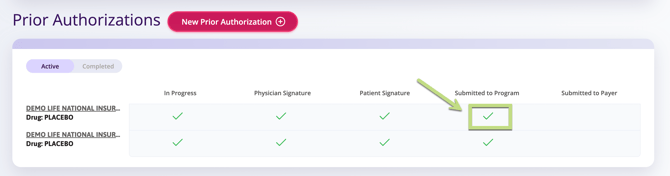
If all other requirements are complete, the status changes to Submitted to Program.
 NOTE Some fields may be pre-populated with data from Auxita. Ensure all required fields, including signatures, are completed.
 TIP Like Enrolment Forms, Prior Authorization forms can be saved as a draft using Save & Close.
From the Patients Section
-
Select the Patient.
-
Go to the Program Overview Tab.
-
Click the New Prior Authorization button.
-
Select the Prior Authorization Form from the list of available forms.

-
The Prior Authorization Form will open automatically.
-
Complete the fields required.
-
Select Send for signature or Submit in the reimbursement form to update the status.
-
The patient or physician will receive a notification from Auxita to sign If required.
-
Once signed, the Reimbursement Status on the enrolment card shows an update on the status of the reimbursement.
-
If all other requirements are complete, the status changes to Submitted to Program.
 TIP The Patient PSP Journey or Activity Table can help track the patient’s progress and view timestamps of submitted requests.