---
title: How to Complete a Document Request
description: Complete a document request and upload the supporting documentation from the Home section, Patients section or Programs section.
---
[Skip to content](https://help.auxita.com/how-to-complete-a-document-request#main-content)
- [English - Canada](https://help.auxita.com/how-to-complete-a-document-request)
- [Français - Canada](https://help.auxita.com/fr-ca/fr-ca/comment-remplir-une-demande-de-document)
English - Canada
Show submenu for translations
[Contact Support](https://help.auxita.com/kb-tickets/new?hsLang=en-ca)
[](https://help.auxita.com/?hsLang=en-ca)
- [🖥️ Log into Auxita](https://my.auxita.com/)
- [▶️ Watch video tutorials](https://help.auxita.com/onboarding-videos)
- [🌐 About Auxita](https://auxita.com/)
Open main navigation
Close main navigation
- [🖥️ Log into Auxita](https://my.auxita.com/)
- [▶️ Watch video tutorials](https://help.auxita.com/onboarding-videos)
- [🌐 About Auxita](https://auxita.com/)
- - [English - Canada](https://help.auxita.com/how-to-complete-a-document-request)
- [Français - Canada](https://help.auxita.com/fr-ca/fr-ca/comment-remplir-une-demande-de-document)
English - Canada
Show submenu for translations
- [Contact Support](https://help.auxita.com/kb-tickets/new)
- [What's new?](https://release.auxita.com/)
[What's new?](https://release.auxita.com/?hsLang=en-ca)
We're here to help you
- There are no suggestions because the search field is empty.
1. [Auxita Help](https://help.auxita.com/?hsLang=en-ca)
2. [Healthcare Providers & Prescribers](https://help.auxita.com/healthcare-providers-prescribers?hsLang=en-ca)
3. [Documents](https://help.auxita.com/healthcare-providers-prescribers?hsLang=en-ca#documents)
November 20, 2025
# How to Complete a Document Request
## Complete a document request and upload the supporting documentation from the Home section, Patients section or Programs section.
Document Requests show up under **Requests** and **Messages** on the **Home Dashboard**.

A note that the user wrote when requesting the document appears, and a pink "**Click here to upload"** option.
All requests assigned directly to you, along with requests that weren't designated for any specific user will appear here for review.
Requests that weren’t designated to a specific user are visible for all Auxita users in the Facility.
After clicking **Click here to upload** the **Document Request** window opens.

Click **Browse** to locate the file on your computer. The **File’s Name** populates based on the attachment name but can be edited if desired.
When ready to upload the request, click **Submit.**
#### **Other Places to view Document Requests**
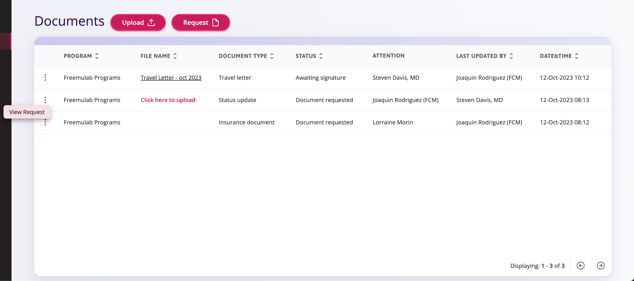
You can complete a Document Request from the **Patients** section or the **Programs** section.
Within the **Documents** table in either the **Patients** or **Programs** section click the ellipses on the left to **View Request** or click right on **Click here to upload**.
- [Getting Started](https://help.auxita.com/getting-started?hsLang=en-ca)
- [Healthcare Providers & Prescribers](https://help.auxita.com/healthcare-providers-prescribers?hsLang=en-ca#main-content)
- [General](https://help.auxita.com/healthcare-providers-prescribers?hsLang=en-ca#general)
- [Enrolment](https://help.auxita.com/healthcare-providers-prescribers?hsLang=en-ca#enrolment)
- [Documents](https://help.auxita.com/healthcare-providers-prescribers?hsLang=en-ca#documents)
- [Referral Enrolments](https://help.auxita.com/healthcare-providers-prescribers?hsLang=en-ca#referral-enrolments)
- [Patient Management](https://help.auxita.com/healthcare-providers-prescribers?hsLang=en-ca#patient-management)
- [Messaging](https://help.auxita.com/healthcare-providers-prescribers?hsLang=en-ca#messaging)
- [Premium Features](https://help.auxita.com/healthcare-providers-prescribers?hsLang=en-ca#premium-features)
- [Patient Support Programs](https://help.auxita.com/patient-support-programs?hsLang=en-ca#main-content)
- [General](https://help.auxita.com/patient-support-programs?hsLang=en-ca#general)
- [Prior Authorizations](https://help.auxita.com/patient-support-programs?hsLang=en-ca#prior-authorizations)
- [Pharmacy](https://help.auxita.com/pharmacy?hsLang=en-ca#main-content)
- [Appointments/Scheduling](https://help.auxita.com/pharmacy?hsLang=en-ca#appointments-scheduling)
- [Patients](https://help.auxita.com/patients?hsLang=en-ca)
- [Account & Settings](https://help.auxita.com/account-settings?hsLang=en-ca#main-content)
- [Integrations](https://help.auxita.com/account-settings?hsLang=en-ca#integrations)
- [Additional Forms](https://help.auxita.com/additional-forms?hsLang=en-ca)
[](https://auxita.com)
##### **Taking care of healthcare.**
Auxita’s digital platform seamlessly and securely connects physicians, patients, insurance providers, and patient support programs together –
reducing administrative burdens and empowering medical practices to deliver care faster and more efficiently to patients.