
Consent is required before your request in the Patient Support Program can proceed.
Your Healthcare Provider may obtain this consent either by collecting a physical signature in the office or by sending you a digital consent form via the Auxita platform.
 NOTE If consent is not captured in the office, a notification will be sent to you via email or text message (SMS). To begin, click the button or link to open the page in a browser.
Email examples / SMS Examples
(click < > arrows to flip through)
- You will be prompted to confirm your identity by entering your date of birth.
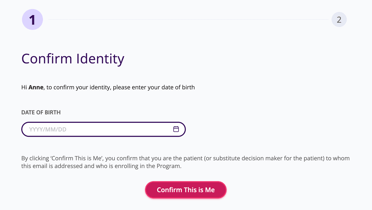
- Click Confirm This Is Me to continue.
- Next, you will be prompted to Provide Consent.
- Click the pink button to continue
Each consent document may look different, depending on the Program or type of consent.
Read through the form displayed on the screen, complete any required fields, and electronically sign your name.
NOTE Required fields are denoted by an asterisk.