---
title: "Guest Prescribers: Download a PDF Copy of Your Submitted Form"
description: After signing and submitting an One-Time Use (OTU) form, you can download a PDF copy directly from the Thank You page for your records.
---
[Skip to content](https://help.auxita.com/download-a-pdf-copy-of-your-submitted-form#main-content)
- [English - Canada](https://help.auxita.com/download-a-pdf-copy-of-your-submitted-form)
- [Français - Canada](https://help.auxita.com/fr-ca/download-a-pdf-copy-of-your-submitted-form)
English - Canada
Show submenu for translations
[Contact Support](https://help.auxita.com/kb-tickets/new?hsLang=en-ca)
[](https://help.auxita.com/?hsLang=en-ca)
- [🖥️ Log into Auxita](https://my.auxita.com/)
- [▶️ Watch video tutorials](https://help.auxita.com/onboarding-videos)
- [🌐 About Auxita](https://auxita.com/)
Open main navigation
Close main navigation
- [🖥️ Log into Auxita](https://my.auxita.com/)
- [▶️ Watch video tutorials](https://help.auxita.com/onboarding-videos)
- [🌐 About Auxita](https://auxita.com/)
- - [English - Canada](https://help.auxita.com/download-a-pdf-copy-of-your-submitted-form)
- [Français - Canada](https://help.auxita.com/fr-ca/download-a-pdf-copy-of-your-submitted-form)
English - Canada
Show submenu for translations
- [Contact Support](https://help.auxita.com/kb-tickets/new)
- [What's new?](https://release.auxita.com/)
[What's new?](https://release.auxita.com/?hsLang=en-ca)
We're here to help you
- There are no suggestions because the search field is empty.
1. [Auxita Help](https://help.auxita.com/?hsLang=en-ca)
2. [Healthcare Providers & Prescribers](https://help.auxita.com/healthcare-providers-prescribers?hsLang=en-ca)
September 1, 2026
# Guest Prescribers: Download a PDF Copy of Your Submitted Form
## After signing and submitting a form, you can download a PDF copy directly from the Thank You page for your records.
How to Download a PDF
1. Complete and submit your form.
2. On the **Thank You** page, click **Download**.
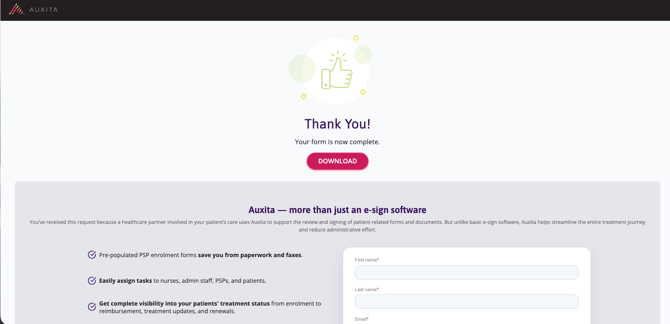
3. Wait while the PDF is generated.
4. After the PDF is generated, the download will start automatically.
**NOTE** PDFs are generated only when you select **Download**.
** TIP**
- Download links expire after 1 minute for security purposes.
- The **Download** option is available for up to 24 hours after you reach the Thank You page.
- If you leave or refresh the page, you may lose access to the download option.
- [Getting Started](https://help.auxita.com/getting-started?hsLang=en-ca)
- [Healthcare Providers & Prescribers](https://help.auxita.com/healthcare-providers-prescribers?hsLang=en-ca#main-content)
- [General](https://help.auxita.com/healthcare-providers-prescribers?hsLang=en-ca#general)
- [Enrolment](https://help.auxita.com/healthcare-providers-prescribers?hsLang=en-ca#enrolment)
- [Documents](https://help.auxita.com/healthcare-providers-prescribers?hsLang=en-ca#documents)
- [Referral Enrolments](https://help.auxita.com/healthcare-providers-prescribers?hsLang=en-ca#referral-enrolments)
- [Patient Management](https://help.auxita.com/healthcare-providers-prescribers?hsLang=en-ca#patient-management)
- [Messaging](https://help.auxita.com/healthcare-providers-prescribers?hsLang=en-ca#messaging)
- [Premium Features](https://help.auxita.com/healthcare-providers-prescribers?hsLang=en-ca#premium-features)
- [Patient Support Programs](https://help.auxita.com/patient-support-programs?hsLang=en-ca#main-content)
- [General](https://help.auxita.com/patient-support-programs?hsLang=en-ca#general)
- [Prior Authorizations](https://help.auxita.com/patient-support-programs?hsLang=en-ca#prior-authorizations)
- [Pharmacy](https://help.auxita.com/pharmacy?hsLang=en-ca#main-content)
- [Appointments/Scheduling](https://help.auxita.com/pharmacy?hsLang=en-ca#appointments-scheduling)
- [Patients](https://help.auxita.com/patients?hsLang=en-ca)
- [Account & Settings](https://help.auxita.com/account-settings?hsLang=en-ca#main-content)
- [Integrations](https://help.auxita.com/account-settings?hsLang=en-ca#integrations)
- [Additional Forms](https://help.auxita.com/additional-forms?hsLang=en-ca)
[](https://auxita.com)
##### **Taking care of healthcare.**
Auxita’s digital platform seamlessly and securely connects physicians, patients, insurance providers, and patient support programs together –
reducing administrative burdens and empowering medical practices to deliver care faster and more efficiently to patients.